How to turn an image into a PDF on iPhone
Create a PDF copy of a photo or image for an upload, document attachment, or shared reference. The conversion runs on your iPhone or iPad.
When this is useful
A PDF is useful when the destination expects a document rather than an image. Converting a photo to PDF keeps it as an image on a page; it does not turn photographed text into editable text.
Import the image
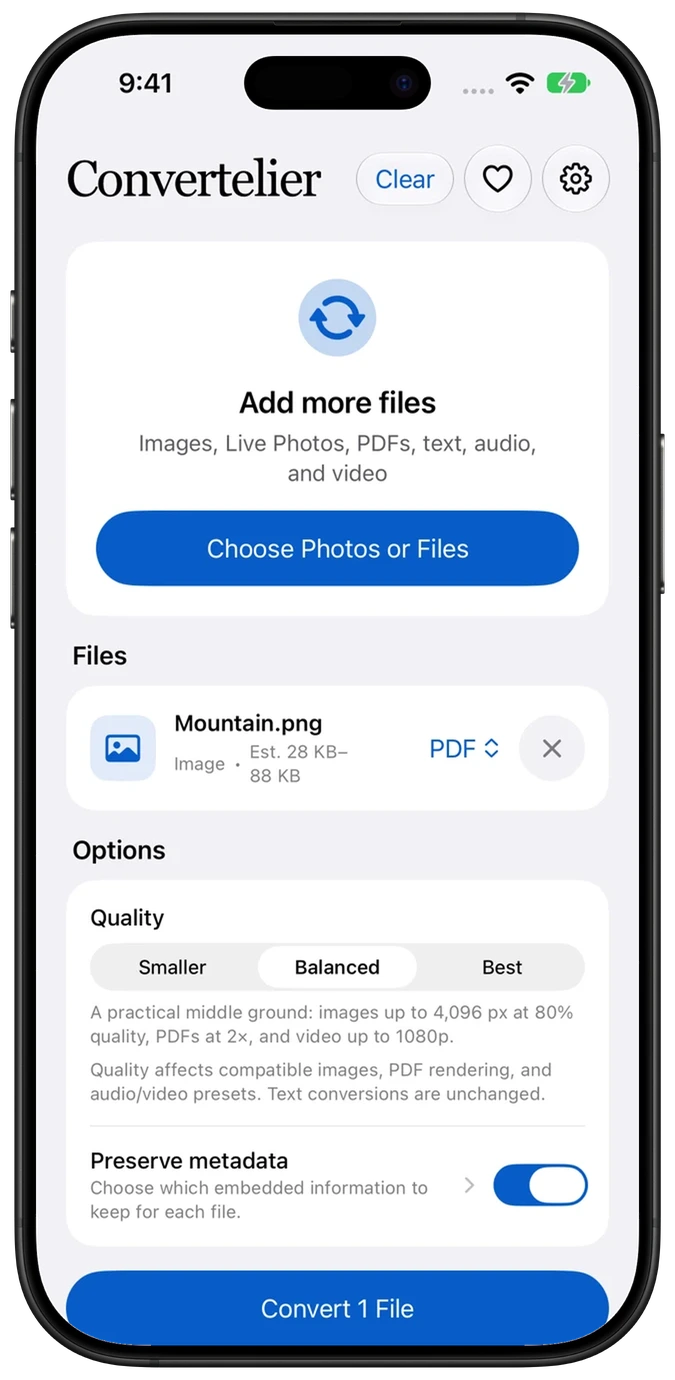
In Convertelier, tap Choose Photos or Files. Use Photo Library for a photo, or Files for an image saved in a folder. Select one image for this walkthrough.
Choose PDF
Tap the imported file’s output format and select PDF. Keep Balanced quality for a general-purpose copy, or choose a different preset for your needs.
Create and share the PDF
Tap Convert 1 File. In the share sheet, choose Save to Files to keep a copy, or send it to another app. Preview Converted Files lets you inspect the result after closing the share sheet.
Watch the walkthrough
Follow the numbered steps in the video. Highlights point out the controls to use. This edited iOS Simulator recording uses a generated sample; the written steps above also cover importing your file.
Common questions
Can I make one PDF from several images?
Yes, through the Convert Images to PDF action in Apple Shortcuts. It accepts up to 25 images in order. The main app’s per-file PDF output is a separate workflow.
Will the text in my photo become editable?
No. This workflow places the image into a PDF; it does not perform text recognition.
Where is the finished PDF?
The result is available in Convertelier’s local history for up to 24 hours. Use Save to Files to keep a copy beyond that period.
Try it with your own file
Every conversion feature is free. No account or subscription is required. Optional tips support development.
More tutorials